
How to Write a YouTube Description That Actually Helps You Rank
The description is the most neglected field on the upload page — usually a link dump written in the last thirty seconds before publishing. That is a small tragedy, because it is one of the few places you can talk to the search algorithm in full sentences. Here is what belongs there, in what order, and what to stop wasting effort on.
Why the description still matters
YouTube reads the description to understand your video's topic, context and related phrases — it supplements what the title cannot fit. It will not rescue a bad video, but between two similar videos on a contested keyword, the one whose description clearly and repeatedly (but naturally) confirms the topic has the edge. It also feeds Google search results, where YouTube videos rank as web pages and the description supplies the snippet.
The first 150 characters are the whole game
Search results and mobile surfaces show only the first line or two of a description — roughly 150 characters — before "...more". That visible fragment is effectively a second meta description: it should contain your target keyword and the concrete promise of the video, written for a human deciding whether to click. What it should never contain: "SUBSCRIBE HERE", a wall of social links, or a sponsor code. All of that belongs below the fold.
A structure that works
After the opening two lines, a reliable order: a short paragraph expanding what the video covers (this is where related phrases and natural keyword variations live), then timestamps if the video has distinct parts — chapters make the video navigable, show up in search as key moments, and measurably help retention — then your links (gear, sources, socials), and a single clear call to action near the end.
Timestamps deserve special emphasis: two or more "0:00 Topic" lines turn into chapters automatically, and chapters are one of the few description features the algorithm visibly rewards. If you write only one extra thing today, write the chapter list.
Keywords: natural use, not stuffing
Mention your main keyword and close variants a handful of times across the description — roughly two to five mentions in flowing sentences. Repeating the phrase twenty times, or pasting a "tags: keyword1, keyword2, ..." block, is classic stuffing: at best ignored, at worst a spam signal. The test is simple: read it aloud; if it sounds like it was written for a robot, it is hurting you with the robot too.
Hashtags, tags and other myths
Hashtags: a few relevant ones are fine and display above the title; past fifteen, YouTube ignores all of them — a real, documented cutoff. The tags field (the separate metadata box, not hashtags) matters far less than folklore says; it mainly helps with misspellings and variants. And no, keywords hidden as invisible text or repeated in comments do nothing except risk a spam flag.
Score it before you publish
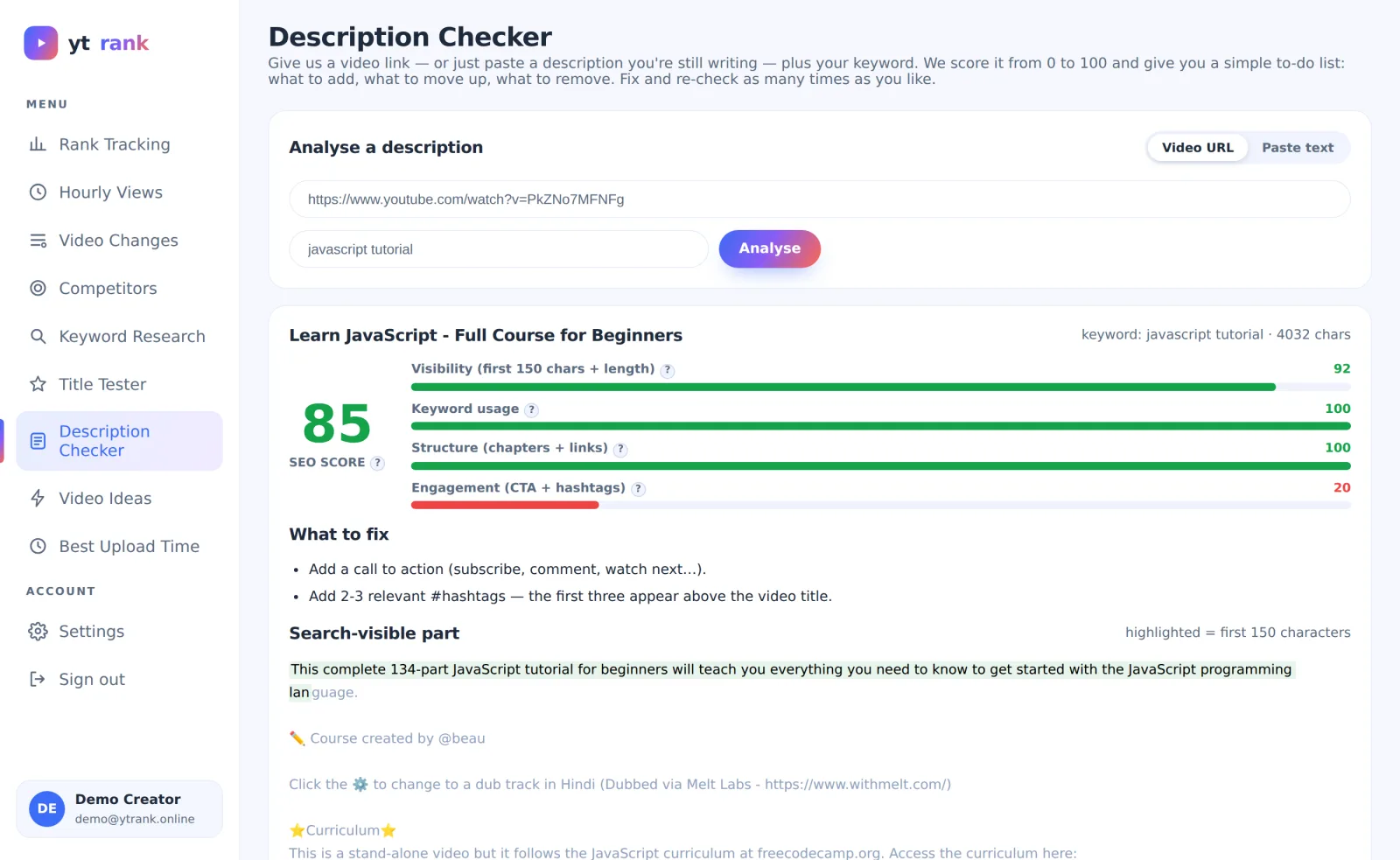
All of the above is checkable mechanically, which means you should not do it by eye. ytrank's Description Checker scores a description 0-100 across visibility (keyword in the first 150 characters, sensible length), keyword use (counting stuffing against you), structure (timestamps, link placement) and engagement (call to action, hashtag count) — and highlights your first 150 characters exactly as search will cut them. Paste mode costs nothing and works on drafts, so the check happens before publishing, when fixes are free.
Run your last five videos through it once: the recurring weakness you find — almost everyone has one — is the habit to fix, and your next twenty descriptions inherit the fix for free.